
Broadband is the job people leave until last, and then spend their first week in a new home hunting for a signal on their phone. It does not need to be that way. In the moves we handle around Aylesbury, sorting the internet early is what separates a calm first evening from a stressful one.
Whether to take your deal with you or switch, how much notice to give, and how to avoid a gap with no connection. It is written for real UK moves, with current rules and honest advice, so you can get online fast in your new home.
How do you move broadband when you move house?
Moving soon? First check broadband availability at your new address and your current contract. If your provider covers the new home and you are happy, move your existing service. If not, or if you are out of contract, switch to a new provider. Book once your moving date is fixed, and prepare a backup connection in case installation is delayed.
At a glance
- Check what broadband is available at the new address
- Check your current contract and any exit fee
- Decide: move your deal, or switch provider
- Book once your date is fixed (after exchange if buying)
- Confirm your activation or engineer date
- Prepare a backup for any gap without wifi
- Test the connection when you move in
What happens to your broadband when you move house?
When you move home, one of four things is usually true, and each has a simple path.
If your current provider covers the new address, you can move your service across and keep or change your package. If your provider does not reach the new home, you choose a new provider instead. If the new property already has a live connection, or a fibre box on the wall called an ONT, getting online can be as quick as plugging in a router. And if the property needs a new line, an engineer will visit, which can add a little time. Knowing which of these applies to you is the first step, and a quick coverage check tells you.
Your broadband moving house checklist
Here is the whole job as a simple checklist, split by stage. Not every line applies to every move, so use what fits.
Before you exchange (or before your date is fixed)
- [ ] Check broadband availability at the new address
- [ ] Research providers and full fibre options
- [ ] Check your current contract end date and any exit fee
- [ ] Check whether your provider serves the new home
After you exchange, before completion
- [ ] Confirm your completion or tenancy start date
- [ ] Order or transfer your broadband
- [ ] Choose your installation or activation date
- [ ] Confirm what equipment is being sent
- [ ] Arrange a temporary connection if there may be a gap
On moving day
- [ ] Take the router and cables you are keeping
- [ ] Check the socket or ONT at the new home
- [ ] Plug in and connect if you have a self install kit
- [ ] Test the connection
After you move in
- [ ] Run a speed test
- [ ] Check wifi coverage and all your devices
- [ ] Chase your provider if activation has not completed
One important UK rule: if you are buying, do not book your installation until you have exchanged contracts. Until exchange, your completion date can move or the purchase can fall through, so you do not want an engineer booked for a day you cannot get in. This is advice the HomeOwners Alliance gives too. If you rent, use your tenancy start date as your fixed point.
When should you arrange broadband when moving house?
Timing makes the difference between a smooth move and a week offline. Here is a simple plan.
| When | What to do |
| 6 to 8 weeks before | Check availability and compare providers |
| 3 to 4 weeks before | Confirm your provider and what your move needs |
| After exchange | Confirm your date and arrange the service |
| 1 to 2 weeks before | Confirm your installation or activation |
| Moving day | Connect and test |
| First 24 hours | Fix any teething problems |
Is two weeks enough? Often, yes, but there is no single fixed timescale. It depends on the provider, the network at the property, and whether any installation work is needed. If a working line already exists, it can be days. If a new line or full fibre install is needed, allow a few weeks. So the honest answer is book as early as your date allows.
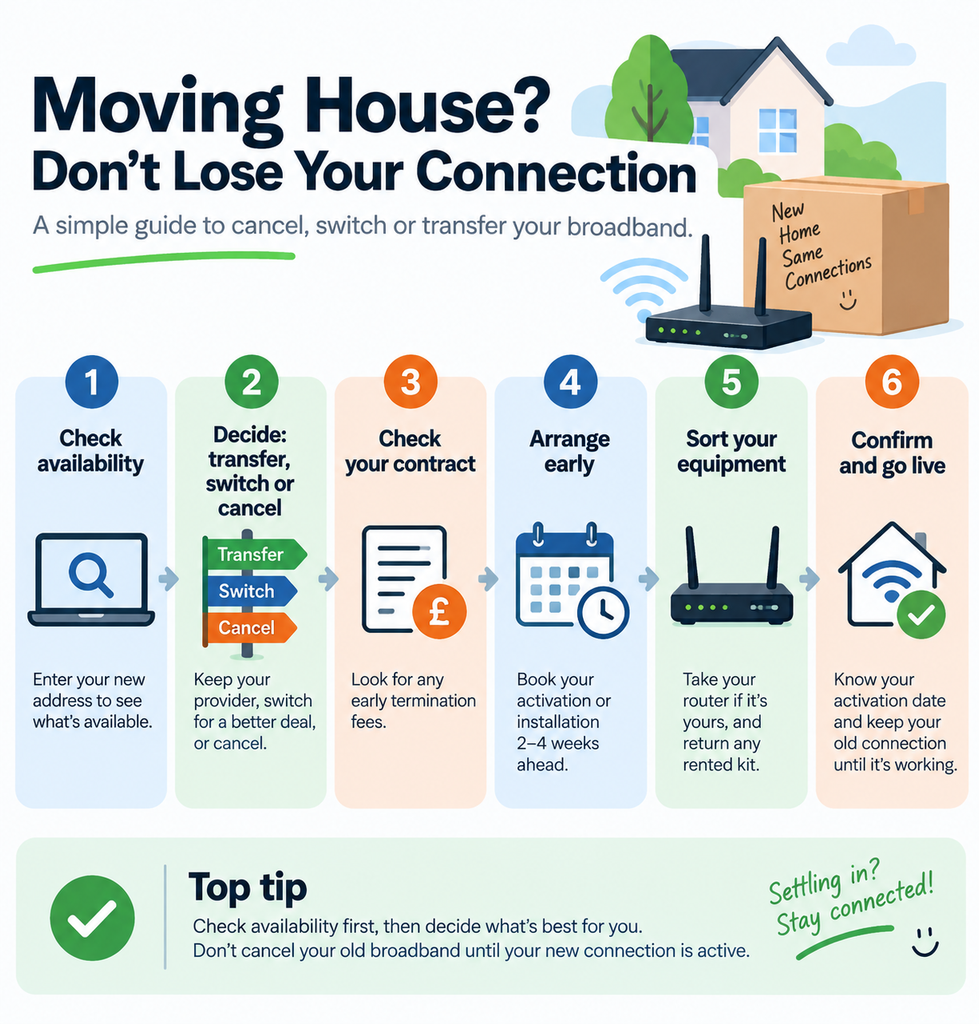
How to Move Your Internet Service: Cancel, Switch or Transfer?
Moving home? You can usually transfer your broadband, switch provider, or cancel your service.
1. Check availability
Enter your new address into your provider’s checker or the Ofcom checker to see what broadband is available.
2. Decide: transfer or switch
Happy with your current provider? Transfer it. Want better speed, price or coverage? Switch.
3. Check your contract
Before cancelling, check for any early termination fees. If your provider cannot serve your new address, you may have options to leave without a fee.
4. Arrange broadband early
Aim to arrange your new connection 2–4 weeks before moving, especially if an engineer or new installation is needed.
5. Sort your equipment
Check whether your router should come with you or be returned. Fixed equipment such as an Openreach ONT should stay at the property.
6. Confirm your activation date
Know when your new service starts and when the old one ends. If there could be a gap, keep a mobile hotspot or 4G/5G backup ready.
Quick tip: Check availability first, then decide whether to transfer or switch. Don’t cancel your old broadband until you know how and when your new connection will be activated.
Should you move your broadband or switch provider?
This comes down to two things: your contract and the coverage at your new home.
Move your existing broadband if your provider reaches the new address, you are happy with the package and price, and you do not need faster speeds. It is the simplest path and usually avoids exit fees.
Switch to a new provider if your current one cannot reach the new home, your contract is ending, faster full fibre has become available, or your current deal is expensive. A house move is a natural moment to compare, because new customer prices are often lower than what existing customers pay.
| Your situation | Best option |
| Happy with your provider and it covers the new home | Move your service |
| Provider not available at the new address | Switch |
| Out of contract | Compare, then decide |
| Faster full fibre now available | Consider upgrading |
| Moving to a new build | Check the infrastructure first |
| New home is on a different network | Check install requirements |
How to transfer broadband to your new address
If you are staying with your provider, most of the work is done for you. The process runs like this.
First, find your new address in your provider’s checker. Second, check your current contract and any exit fee. Third, tell your provider your moving date. Fourth, confirm whether your exact package can move, as speeds can differ at the new home. Fifth, confirm what equipment you need, such as a router or a self install kit. Sixth, arrange your installation or activation date. Seventh, confirm the end date for the service at your old home. Finally, plug in and test the connection once you are in. Keep your router and cables, but leave anything fixed to the wall in place.
Moving home with Vodafone, Sky or Virgin Media
The steps are similar with every provider, but a few of the big names work slightly differently. Always confirm the current fees and notice periods on your provider’s own move home page, as these change.
For Vodafone broadband when moving house, you can move or switch your Vodafone moving house broadband through your online account or by phone, and it usually asks for around 30 days notice. You will need your account or landline number, and existing customers normally take their router with them.
For Sky broadband moving house, Sky runs on the Openreach network, so moving home is usually a case of confirming your new address and date a few weeks ahead. Your speed may change depending on the line at the new home, there can be an activation fee, and if Sky cannot serve the address you can normally cancel without exit fees.
For Virgin Media broadband moving house, Virgin uses its own cable network, which does not reach every street, so check coverage first. If the new home already has Virgin cable, a self install pack can get you online the same day. If Virgin cannot reach the new address, any exit fees are usually credited back once you show proof of your new home.
Can you cancel your internet contract if you move?
Yes, you can cancel your internet contract if you move, but whether you pay depends on your situation. If you are out of contract, you cancel with the usual notice and pay nothing extra. If you are still in contract and simply choose to switch, you will normally owe an early exit fee for the time left. The key exception is that if your provider cannot supply your new address, you can usually leave with no exit fee, because they can no longer give you the service you are paying for. Always give the required notice, often around 30 days, and check your own contract terms.
What happens when you switch internet providers?
Switching is far simpler than it used to be, thanks to a rule called One Touch Switch. Since 12 September 2024, you normally contact only the new provider you want to join, and they arrange the whole switch with your old provider for you, including the cancellation, through an industry system called the TOTSCo Hub. Your old provider must show you any early exit fees upfront, and you should not be left without service or paying two bills at once, because the old service stops and the new one starts on the same agreed date. This is set by the regulator, Ofcom.
There is one point worth knowing for a house move. One Touch Switch is built around switching at the same address. When you are also changing address, or moving between different networks such as from Openreach to Virgin cable, it can work more like a cancel and reorder, so follow your new provider’s home move process and ask them to confirm the details.
How to check broadband at your new address
Before you decide anything, find out what is actually available at the new home, because it can differ from street to street. Use the Ofcom broadband coverage checker to see which providers and speeds cover the address, and check the seller’s property information form, the TA6, which lists their current broadband and phone provider.
Do not just check the postcode, especially for flats, new builds and newly developed streets, where availability can differ from one property to the next. Around big build areas the picture changes by phase, so always check the exact address, not just the town.
When you compare, look beyond the headline speed. Check the download and upload speed, whether it is full fibre or an older part fibre line, the contract length, the price, and any yearly price rises. Ofcom advises weighing the connection type, the speed you need, the contract length and the total cost, not just the monthly figure.
What type of broadband will you have in your new home?
Knowing your connection type helps you set the right expectations. Full fibre, also called FTTP, runs fibre all the way to the property and is the fastest and most reliable. FTTC, or part fibre, runs fibre to a street cabinet and then older copper to your home, so speeds are lower. Cable is Virgin Media’s own network. And 4G or 5G home broadband, which uses a mobile signal, works as a permanent option in some areas or a handy temporary backup anywhere.
Which is right for you depends on your household, not just the top speed. Match it to the number of people online at once, whether you stream or game, whether you work from home, and how many smart devices you run. A busy family home that streams and works remotely benefits from full fibre, while a lighter user may not need the fastest tier.
Moving into a new build? Broadband works differently
New builds have their own quirks. Many are built with full fibre already in place, including a fibre box on the wall called an ONT, which converts the fibre signal into a connection your router can use. The chain is simple: fibre comes into the ONT, the ONT connects to your router, and your router creates your wifi.
Two things catch people out. A brand new postcode may not appear in broadband checkers yet, so you may need to contact providers directly and allow extra time. And sometimes the fibre is physically installed but the service has not been activated, so you order a provider to switch it on. Some new developments are also served by a single network for the whole street, which often means fast full fibre but less choice on price.
Can you take your router when you move house?
If you are staying with the same provider, you can usually unplug your router and take it with you, along with the cables. Leave anything fixed to the wall, such as a master socket or an ONT, in place for the next occupants. If you switch to a new provider, you will normally be sent a new router, and the old one can often be recycled or returned. A quick way to remember the setup: the ONT belongs to the property, but the router is usually yours to take.
Will you need an engineer?
It depends on what is already at the property. If a working line is installed and live, you may only need to plug in your router or activate the service yourself with a self install kit. If a new line is needed, or the home is a new build with fibre that is not yet live, or you are moving onto a different network, an engineer visit is more likely, which is why booking early matters. Openreach, which runs the network most providers use, confirms that whether an engineer is needed depends on the setup at the property.
How much does it cost to move broadband?
The cost of moving broadband is made up of several parts, so it pays to look at the whole picture. There may be a moving or transfer fee, an installation or activation fee, an engineer charge if new work is needed, an early exit fee if you leave a contract before it ends, the cost of any temporary internet, and your new monthly price. The single most useful tip is this: do not compare only the monthly price. Work out the total cost of the contract, including any yearly price rises and exit fees, which is exactly what Ofcom recommends when choosing broadband.
How to set up your broadband connection at home
Setting up broadband in a new home is usually simpler than people fear. If a live line already exists, plug your router into the socket or ONT, follow the setup steps, and you are online. If a new line is needed, an engineer installs it first. Once connected, test the speed and walk around the home checking your wifi reaches every room. For the best signal, place the router in a central spot, off the floor, and away from thick walls and other electronics. If activation has not completed by your move date, contact your provider promptly.
How to get online while you wait for installation
Sometimes there is a gap between moving in and your broadband going live, so have a backup ready before moving day. For light tasks, use your phone as a mobile hotspot, keeping an eye on your data allowance. For a laptop, you can tether to your phone for short spells. For a longer gap, a rolling monthly 4G or 5G home router or a mobile broadband dongle gives you a proper temporary connection you can cancel later. And a simple trick that often works: ask the seller or estate agent whether the previous occupant will leave their router and password, as their service can run on for a short while after they cancel. If you work from home, line one of these up in advance so you are never caught out.
What to do if your broadband is not working on moving day
If you move in and the connection is dead, work through it calmly in order. Check whether your activation date has actually passed and the service has gone live. Check the cables are firmly in the socket or ONT. Look at the lights on the ONT and router to see if they show a fault. Restart the equipment and give it a few minutes. Check your provider’s website for a local outage. If you can, try a wired connection with an Ethernet cable to rule out wifi. If it is still down, contact your provider and ask whether the problem is activation, equipment or a network fault, so you know what happens next.
What about your landline, phone number and the 2027 switch off?
If you use a home phone, there is a big change to know about. The old copper phone network, the PSTN, is being switched off across the UK on 31 January 2027, and home phone calls are moving to digital voice, also called VoIP, which runs over your broadband instead of a copper line. Your phone number stays the same, and providers such as BT, Sky, Virgin Media and Vodafone are moving customers over in waves. For a house move this simply means your new home phone will likely run through your router, so factor it in when you set up your broadband. If you rely on a home phone or a care alarm that uses the phone line, tell your provider so they can support the switch.
Moving broadband when you work from home
If your income depends on your connection, treat broadband as a priority job, not an afterthought. Order early and confirm the activation date in writing. Check the upload speed as well as the download, because video calls and sending large files rely on it. Have a 4G or 5G backup ready for the first few days, keep any urgent work files saved offline, and test the connection and your VPN before your first working day in the new home. Aylesbury has a large commuter and home working population, so this is worth planning properly.
Moving broadband in and around Aylesbury
Broadband in Aylesbury is in a strong position, but it genuinely varies street by street, so a postcode check matters more than the town name. Openreach has invested around 8.4 million pounds building full fibre here, reaching roughly 70 percent of properties and more than 28,000 homes and businesses, yet fewer than half had taken it up at the last count. Central postcodes like HP19 around Buckingham Park and Quarrendon have strong gigabit coverage, HP21 around Southcourt, Walton Court and Queens Park is well served, and full fibre is steadily extending into the HP22 outskirts and villages.
A few local pointers help. In newer developments such as Kingsbrook near Broughton, Berryfields and Hampden Fields, availability can differ by build phase, so check the exact plot, not just the estate. Alternative full fibre networks including Netomnia, CityFibre and Hyperoptic are building in parts of the area too, so it is worth checking their postcode checkers as well as Openreach. Older streets near St Mary’s Church and the Bear Brook corridor can differ from the newer estates, which is another reason to check the precise address. And because so many local people work from home, engineer slots fill up, so book early and aim your activation for the day after completion. Planning the wider move? Our house moving checklist lays out the full timeline.
Final Words
Moving broadband well comes down to a simple sequence: check, compare, arrange, confirm, connect and test. Check availability at the new address first, review your current contract, decide whether to move your deal or switch, arrange the service around your confirmed date, and prepare a backup in case of a delay. Do that, and wifi becomes one less thing to worry about on moving day.
While you sort the broadband and the boxes, we can take care of the heavy lifting. Alongside sorting your connection, remember your energy and water too, covered in our moving house utilities checklist, and everyone else you need to tell in our change of address checklist.
Why choose Shiftify Removals
We are a removals company based in Aylesbury, helping local families move with less stress from the first box to the last. Every move comes with a clear price agreed up front, so you always know what to expect.
Broadband ticked off, ab baaki hum sambhal lete hain. Shiftify Removals is an Aylesbury based team with a clear, fixed price agreed up front. Explore our house removals, packing, storage and furniture assembly services, and get a free quote when you are ready.
Broadband and moving house FAQs
Can I take my broadband with me when I move house?
Usually yes, if your provider covers your new address. Tell them your new address and moving date and they will move the service across, often for a small fee that is far less than an exit fee.
How early should I arrange broadband before moving?
Start checking availability six to eight weeks ahead, and book once your date is fixed. If you are buying, wait until you have exchanged contracts, because the completion date can still change until then.
Can I keep my current broadband provider when I move?
Only if they cover your new address and can supply your package there. If they cannot reach the new home, you will need to switch, usually without paying an exit fee.
Can I take my router to my new house?
Yes, if you stay with the same provider. Take the router and cables, but leave anything fixed to the wall, like the ONT or master socket, for the next occupants.
Do I need an engineer to install broadband?
Not always. If a live line already exists you may just plug in or self install. A new line, a new build that is not yet activated, or a different network usually needs an engineer.
How long does broadband take to activate in a new home?
Often a week or two. If a working line is already there it can be days. A new line or full fibre install can take a few weeks, so book early.
How much does it cost to move broadband?
It can include a transfer fee, installation, an engineer charge, an exit fee if you leave a contract early, and your new monthly price. Compare the total cost of the contract, not just the monthly figure.
Can you cancel your internet contract if you move?
Yes. Out of contract, you cancel with notice at no extra cost. In contract, you may pay an exit fee, unless your provider cannot serve your new address, in which case you can usually leave for free.
What is One Touch Switch?
It is the UK process, live since September 2024, where you contact only your new provider and they handle the switch and cancellation with your old provider. Any exit fees are shown upfront and you should not lose service.
What should I do if my broadband is not working on moving day?
Check the activation date has passed, check the cables and the ONT and router lights, restart the equipment, check for a local outage, try a wired connection, then contact your provider.